

Module
Abmeldungen
Abmeldungen
Das Abmeldemodul ermöglicht es Teammitgliedern, sich für bestimmte Zeiträume oder spezifische Events abzumelden. Diese Funktion ist besonders nützlich für Teambesprechungen, da sich abgemeldete Mitglieder automatisch als "abgemeldet" in den entsprechenden Meetings anzeigen lassen, wenn die Abmeldung mit dem Besprechungszeitraum übereinstimmt.
Funktionsweise
Das Abmeldungssystem bietet folgende Möglichkeiten:
- Zeitraum-basierte Abmeldungen: Abmeldung für einen bestimmten Zeitraum
- Event-spezifische Abmeldungen: Gezielte Abmeldung für einzelne Besprechungen
- Automatische Integration: Verknüpfung mit dem Besprechungsmodul
- Begründung erforderlich: Transparenz durch Angabe von Abmeldegründen
Abmeldungen einsehen
Alle deine Abmeldungen kannst du übersichtlich in deinem Teamprofil einsehen:
Navigation: Teamprofil > Deine Abmeldungen
.31a7e6d3.png&w=3840&q=75)
Übersicht
In der Abmeldungsübersicht siehst du alle aktiven und vergangenen Abmeldungen, inklusive Zeitraum und Begründung.
Neue Abmeldung erstellen
Eine Abmeldung zu erstellen ist einfach und schnell:
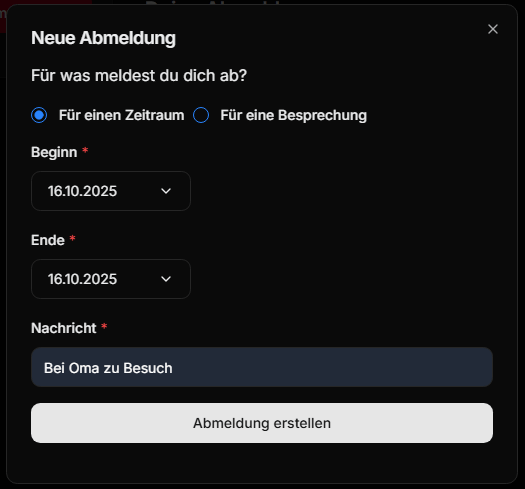
Schritt-für-Schritt Anleitung
- Navigation: Gehe zu
Teamprofil > Deine Abmeldungen - Erstellen: Klicke auf das "+"-Symbol bei "Deine Abmeldungen"
- Konfiguration: Fülle das Abmeldungsformular aus:
- Zeitraum: Wähle den Zeitraum der Abmeldung
- Oder Besprechung: Alternative - wähle eine spezifische Besprechung
- Begründung: Gib einen nachvollziehbaren Grund an
- Absenden: Bestätige die Abmeldung
Abmeldungsarten
Zeitraum-basierte Abmeldung
- Verwendung: Für längere Abwesenheiten (Urlaub, Krankheit, etc.)
- Vorteil: Automatische Berücksichtigung in allen Meetings des Zeitraums
- Beispiel: "Urlaub vom 15.08. bis 22.08.2024"
Event-spezifische Abmeldung
- Verwendung: Für einzelne Besprechungen oder Events
- Vorteil: Präzise Abmeldung ohne Auswirkung auf andere Termine
- Beispiel: "Kann nicht am Weekly-Meeting am 20.08.2024 teilnehmen"
Integration mit anderen Modulen
Besprechungsmodul
- Automatische Markierung als "abgemeldet" in relevanten Meetings
- Keine Anrechnung auf Anwesenheitsstatistiken während Abmeldungen
- Sichtbare Begründung für Besprechungsleiter
Automatisierung
- Mögliche Benachrichtigungen über neue Abmeldungen
- Integration mit Discord-Benachrichtigungen
- E-Mail-Updates für Teamleitung
Best Practices
Rechtzeitig abmelden
- Abmeldungen so früh wie möglich einreichen
- Mindestens 24 Stunden vor einem Meeting abmelden
- Bei Krankheit: Schnellstmöglich nachreichen
Aussagekräftige Begründungen
- Kurz und präzise formulieren
- Keine sensiblen Details erforderlich
- Beispiele: "Urlaub", "Krankheit", "Familiärer Termin"
Regelmäßige Überprüfung
- Abgelaufene Abmeldungen regelmäßig überprüfen
- Nicht mehr gültige Abmeldungen löschen
- Plötzliche Verfügbarkeit dem Team mitteilen