

Create Account / Sign In
Sign In & Registration
Welcome to TeamPanel! Authentication for both paths goes through the central page account.team-panel.com/auth.
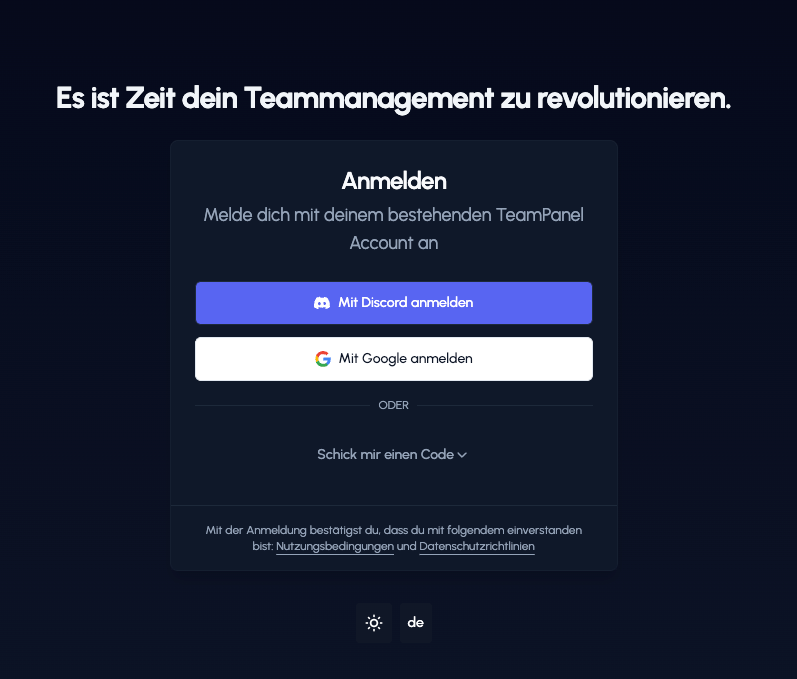
Registration
Registration is the first step to managing your team efficiently. We offer several ways to create an account quickly and easily.
Registration Options
You can register with us in several ways:
- Social Login (Recommended): Register in a flash with your Discord or Google account. This is the easiest option since no additional passwords are required.
- Email: Alternatively, you can sign up the classic way with your email address. In TeamPanel V2, we use "Magic Links" – you enter your email and receive a sign-in link directly in your inbox. You don't need to remember a password.
Important note about your username
When you register, a username is automatically assigned to you. * You can change it once immediately after registration. * Any further changes are only possible every 14 days.
Sign In
Signing in to TeamPanel V2 is straightforward. Either enter your email address and receive a Magic Link, or use one of your social login providers (Discord or Google) directly.
.8c1f5e2a.png&w=3840&q=75)
FAQ & Troubleshooting
Here you'll find answers to common questions and solutions for sign-in or registration issues.